Friday, December 8, 2017

The First Computer Programmer of Bangladesh : Hanif Uddin mia || প্রথম বাংলাদেশি কম্পিউটার প্রোগ্রামারঃ হানিফ উদ্দিন মিয়া

As technology becomes more and more a part of our lives and we get to see the wonders that can bee brought about by programming, there is one Bengali who stayed in the shadow with his monumental legacy - Md. Hanif Uddin Mia, first ever programmer of Bangladesh. Now millennials are getting to know him after eight years since his demise. This illustrious personality has been introduced for the first time in front of the public at this year’s Bangladesh ICT Expo. ICT Department and Bangladesh Computer Society (BCS) has jointly honored this towering figure posthumously. Son of a schoolteacher, Hanif Uddin was born on 1st November 1929 and grew up in the village of Hulhulia, surrounded by the famous Chalan Beel of Natore. Eldest of two brothers and one sister,Hanif Uddin grew up in a solvent household. Despite that, he had to stay as sublet for higher education. Hanif Uddin’s academic training was in computer science and numerical mathematics. But his interest in learning was as diverse as the knowledge itself, including arts and literature. He could speak Urdu, Arabic, Hindi, German and Russian in addition to Bangla and English. He passed his matriculation in 1946 from Calcutta University and went on to graduate from Dhaka University in 1948 with a first class in the ISC exam. The same year he earned his BSc with first class and distinction. In 1952, he graduated MSc in Applied Mathematics with a first class, placing first in his class and earning a gold medal. He attended the Institute of Information Theory and Automation in Prague, of then Czechoslovakia and received training on Analogue Computer Technique and Digital Computer Programming in 1960. He received further training in System Analysis, Numerical Mathematics, Advanced Computer Programming and Operation Research for MIT. After receiving his degree in Prague, Hanif Uddin came back home. Meanwhile in 1964, a second generation digital mainframe computer was installed at the then East Pakistan Atomic Energy Commission established in what is now the Teacher-Student Center of Dhaka University. The commission was looking for qualified people who would be able to install the computer after it was imported. That is when Hanif Uddin got his big break. In time he became the director of Computer Service Division of Bangladesh Atomic Commission. In 1975, he received training on Operating System and System Programming at IBM Research Center in London. Later from 1975 till the end of the decade, he worked as a System Analyst at International Atomic Energy Agency (IAEA), working on analysis, design, and software implementation of computer application program. He assisted scientists, engineers and researchers with data analysis, program development, and training on an IBM1620 mainframe. Hanif Uddin also taught Mathematics as a visiting professor at Dhaka University. Because of his philanthropic initiative, more than a hundred students went on to become Engineers. In 2000, he donated desktop computers to Hulhulia High School. Hanif Uddin Mia passed away on 11th March 2007. He had been teaching Mathematics and Computer Science till his death. He was also one of the co-founders of Bangladesh Mathematics Society.


...
...
তথ্যপ্রযুক্তি ক্ষেত্রে অবদানের জন্য আইসিটি এক্সপো ১৫ তথ্যপ্রযুক্তি সম্মাননা স্মারক (মরণোত্তর) পেলেন বাংলাদেশের প্রথম কম্পিউটার প্রোগ্রামার মো. হানিফুদ্দিন উদ্দিন মিয়া। বুধবার সন্ধ্যায় বঙ্গবন্ধু আন্তর্জাতিক সম্মেলন কেন্দ্রে আইসিটি এক্সপো-২০১৫-এর সমাপনী অনুষ্ঠানে এ গুণী ব্যক্তিকে সম্মানিত করা হয়। সমাপনী অনুষ্ঠানের প্রধান অতিথি অর্থমন্ত্রী আবুল মাল আবদুল মুহিত হানিফুদ্দিন উদ্দিন মিয়ার ছেলে শরীফ হাসান ও মোস্তফা জব্বারের হাতে এ সম্মাননা স্মারক তুলে দেন। ১৯২৯ সালে নাটোর জেলার সিংড়া থানার হুলহুলিয়া গ্রামে বাংলাদেশের প্রথম কম্পিউটার প্রোগ্রামার মো. হানিফুদ্দিন উদ্দিন মিয়া জন্মগ্রহণ করেন। ১৯৬৪ সালের শেষ দিকে বাংলাদেশে আসা এবিএম ১৬২০ কম্পিউটারটি বাংলাদেশ পরামাণু শক্তি কমিশনে স্থাপন ও পরিচালনার পেছনে তার অনন্য অবদান রয়েছে। ১৯৯৭ সালে বাংলাদেশ টেলিভিশনের কম্পিউটার অনুষ্ঠানের মাধ্যমে তিনি প্রথম মিডিয়ার সামনে আসেন। ২০০৭ সালে এ গুণী ব্যক্তির মৃত্যু হয়। এই গুণী ব্যক্তির বিস্তারিত জানাতে গিয়ে তথ্যপ্রযুক্তিবিদ মোস্তফা জব্বার তার ফেসবুকে লেখেন, মো. হানিফ উদ্দিনের একমাত্র পুত্র শরীফ হাসান তার পিতার জীবন সম্পর্কে আমাকে একটি ছোট্ট বিবরণ পাঠিয়েছেন। আমি সেটি এখানে তুলে ধরছি। তবে আমার কাছে তার সম্পর্কে আরও অনেক তথ্য আছে। সময় মতো প্রকাশ করব।
মো. হানিফ উদ্দিন মিয়া, নাটোর জেলার সিংড়া থানার হুলহুলিয়া গ্রামের রজব আলী তালুকদারের প্রথম সন্তান। তার জন্ম ১৯২৯ সালের পহেলা নভেম্বর। নাটোর জেলার হুলহুলিয়া গ্রামের এই কৃতী সন্তান বাংলাদেশ পরমাণু শক্তি কমিশনের কম্পিউটার সার্ভিস ডিভিশনের ডাইরেক্টর পদে অধিষ্ঠিতছিলেন। পারিবারিক জীবনে স্ত্রী ফরিদা বেগম ও এক প্ত্রু এবং দুই কন্যা সন্তানের জনক তিনি।
প্রাতিষ্ঠানিক শিক্ষার বিষয় কম্পিউটার সায়েন্স ও নিউমেরাল ম্যাথেমেটিকস থাকা সত্ত্বেও শিল্প-সাহিত্যসহ আরও নানাবিধ বিষয়ে জ্ঞান অর্জনের প্রতি তার ছিল অপরিসীম আগ্রহ ছিল। তিনি বাংলা ও ইংরেজি ছাড়াও উর্দু, আরবি, হিন্দি, জার্মান ও রাশিয়ান ভাষা জানতেন। তিনি ১৯৫২ সালে ঢাক বিশ্ববিদ্যালয় থেকে ফলিত গণিতে প্রথম শ্রেণীতে স্বর্ণপদকসহ প্রথমস্থান পান।
তিনি ১৯৬০ সালে ইন্সটিটিউট অব ইনফরমেশন থিওরি অ্যান্ড অটোমেশন, চেকোস্লোভাক একাডেমি অব সায়েন্স, প্রাগ থেকে এনালগ কম্পিউটার টেকনিক এবং ডিজিটাল কম্পিউটার প্রোগ্রামিং-এ প্রশিক্ষণ গ্রহণ করেন। ১৯৬৪ সালে সিস্টেম এনালিসিস, নিউমেরাল ম্যাথেমেটিকস, এডভান্স কম্পিউটার প্রোগামিং, অপারেশন রিসার্চে এম. আই. টি (ইউ, এস, এ) কম্পিউটার সেন্টার থেকে প্রশিক্ষণ গ্রহণ করেন। ১৯৭৫ সালে আইবিএম রিসার্চ সেন্টার লন্ডন থেকে অপারেটিং সিস্টেম ও সিস্টেম প্রোগামিং এ প্রশিক্ষণ গ্রহণ করেন। তারপর তিনি ১৯৭৫ থেকে ১৯৮০ আন্তর্জাতিক পরমাণু শক্তি সংস্থায় (ওঅঊঈ) প্রোগ্রামার এনালিস্ট হিসেবে এনালাইসিস, ডিজাইন, সফ্টওয়্যার ইমপ্লিমেন্টেশন অব কম্পিউটার এপলিকেশন প্রোগ্রাম সংক্রান্ত বিষয়ে কর্মরত ছিলেন।
তিনি ১৯৮৮ সালে ঢাকা ইউনিভার্সিটিতে পার্টটাইম (গণিত) শিক্ষকতা করেন। এ ছাড়াও বিভিন্ন সময়ে তিনি গণিতশাস্ত্র ও কম্পিউটার বিষয়ে শিক্ষকতা করেছেন।
বাংলাদেশ কম্পিউটার বিজ্ঞানের অগ্রযাত্রার সঙ্গে জনাব মোহাম্মদ হানিফ উদ্দিন মিয়ার নাম গভীরভাবে সম্পৃক্ত।
১৯৬৪ সালে বাংলাদেশ (তৎকালীন পূর্ব পাকিস্তান) পরমাণু শক্তি কমিশনের কেন্দ্র ঢাকায় বাংলাদেশের প্রথম কম্পিউটার (ওইগ১৫২০) স্থাপিত হয়। এটি ছিল দ্বিতীয় প্রজন্মের একটি ডিজিটাল মেইনফ্রেম কম্পিউটার।
.
#আইটি_ডেস্ক_যুগান্তর

Tuesday, April 18, 2017

CCleaner Professional with serial key 2023


CCleaner is the number-one tool for cleaning your PC.
It protects your privacy and makes your computer faster and more secure!

Driver Updater
Say “yes” to better visuals, sound, faster downloading, and streaming. And that’s just the start! Driver Updater helps you keep essential parts of your PC experience working as they should by updating out-of-date software drivers, perfect for gaming, creative hobbies, and more.

PC Health Check

CCleaner's new Health Check analyzes your PC and recommends quick fixes, then automatically tunes and updates it so it starts and runs faster, and is more secure.

1-Click Updates All Your Software

Outdated apps are a security risk. Old software can have vulnerabilities, which are quickly discovered and shared amongst cyber criminals. CCleaner updates your software automatically to close security holes before they can be found.

Faster Computer

Is your computer running slow? As it gets older it collects unused files, settings, resource-hogging applications, and out-of-date drivers which can make it slower and slower. CCleaner cleans up these files, temporarily freezes apps when you're not using them, and updates software drivers to make your PC faster.


Fewer Errors & Crashes

Over time your registry can become cluttered with errors and broken settings which lead to crashes. Out-of-date software drivers can cause similar issues too. CCleaner’s patented registry cleaner clears out this clutter to make your PC more stable, and Driver Updater helps you keep on top any unruly, out-of-date drivers.

Quicker Startup

Many programs run silently in the background when you start up your computer. CCleaner helps you speed up your PC's boot time by letting you disable unneeded programs.


NAME: MAZTERIZE


SERIAL NUMBER: 

C2YW-5VYB-NRAS-SZAK-SZPC

C2YW-6MKA-FVQD-558M-EZPC

C2YW-DA26-QSH5-RVMV-AZPC

C2YW-NJS6-DNCX-E6SY-CZPC

CZYW-PRSH-BXK3-C3YK-IZPC

==============2023===============
C2YW-IAHG-ZU62-INZQ-WZPC

C2YW-2BAM-ADC2-89RV-YZPC

C2YW-XFCX-ABIG-GZD4-8ZPC

C2YW-XK32-GBVV-N3BH-2ZPC

C2YW-JKW5-KK79-XHR2-4ZPC

C2YW-QTRT-ZVCG-PQDK-CZPC

C2YW-GP33-TPIU-BGM8-AZPC


NOTE: You must disable the network before entering the key and active

Safer Browsing

Advertisers and websites track your behavior online with cookies that stay on your computer. CCleaner erases your browser search history and cookies so any internet browsing you do stays confidential and your identity remains anonymous.


Friday, March 24, 2017

ZD Soft Screen Recorder 11.3.0 + Keys & Keygen 2022

ZD Soft Screen Recorder

A software program for recording computer screen & sound into a video file

Was born in 2005, ZD Soft Screen Recorder has been evolving for over 10 years.
High-performance screen recording is always a big advantage of ZD Soft Screen Recorder. Unlike most other screen recording software in the market uses the GDI screen capture method which can result high CPU usage and noticeable system lags, ZD Soft Screen Recorder uses the GPU accelerated screen capture technology we developed to capture screen with low CPU usage and no system lags.


PC game screen rendered by DirectX / OpenGL is usually difficult to be captured by the GDI screen capture method so general screen recording software may get a black screen on DirectX / OpenGL based games, while ZD Soft Screen Recorder can capture them nicely.
ZD Soft Screen Recorder uses the most popular H.264 & AAC codecs for real-time video / audio encoding, this eliminates the intermediate files and greatly extends the recording duration capability.


Plus with tons of auxiliary features, ZD Soft Screen Recorder is able to handle various kinds of screen recording tasks such as creating software demo, capturing online video, recording PC gameplay, live screencasting, etc.
The ease of use is our top priority, so we redesigned the software UI from time to time to optimize the user experience. Now ZD Soft Screen Recorder provides both a wizard UI for beginners and a professional UI for masters.


When would you need a Screen Recorder?

  • When you want to show/teach someone how to use a piece of software.
  • When you want to review an important online course/webinar/ meeting afterward.
  • When you want to save a favorite online video but cannot find a download button.
  • When you want to convert your PPT presentation into a replayable video file.
  • When you want to share the wonderful moments of your gameplay with friends.
  • When you want to live stream your gameplay or webcam show to a video website.
  • When you want to share your computer screen with colleagues/students.
  • When you want to review what exactly happened on screen for a particular purpose, e.g., software debugging, software/website usability testing, etc.


Why should you choose ZD Soft Screen Recorder?

  • GPU accelerated screen recording technology.
  • Perfect audio/video synchronization.
  • Capable of capturing DirectX / OpenGL game screen.
  • Cool dynamic zooming effect.
  • Live screencasting.
  • Popular video formats supported.
  • Long duration screen recording.
  • Fully customizable recording options.
  • Easy-to-use software UI design.
System Requirements:

  • OS: Microsoft Windows XP / Vista / 7 / 8 / 8.1 / 10.
  • CPU: Intel / AMD 1.5 GHz or faster multi-core CPU.
  • RAM: 1 GB or more available system RAM.
  • HDD: 20 MB HDD space for software installation.
  • Graphics: NVIDIA / ATI / AMD / Intel graphics card / chip.
  • Software: Windows Media Player, VLC Player or PotPlayer.


Saturday, March 4, 2017

Download windows 10 Untouched from Microsoft by Firefox Browser


1. Open your Mozilla Firefox Browser.
2.  Type about:config in address bar & press Enter key

3. Click "I'll be careful, I promise"  (Don't be afraid =D it's safe) then it'll open.


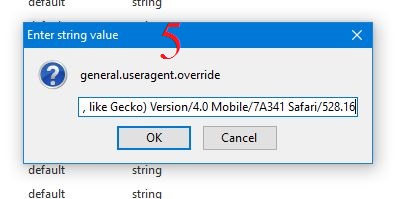
4. Click a Right button of your mouse anywhere. Take a New string  & give the string value  general.useragent.override then click OK. 
5. Again give string value 
Mozilla/5.0 (iPhone; U; CPU iPhone OS 3_0 like Mac OS X; en-us) AppleWebKit/528.18 (KHTML, like Gecko) Version/4.0 Mobile/7A341 Safari/528.16 
 then press OK

6. Complete the modify. Now everything open as mobile format. 
7. Search Windows 10 on google
8. 
9. Now download your desire version of windows 10 with your desire language. 
10. After completing your work You can reset the value of that string. 

11. Enjoy!